New global navigation experience
Major Upgrade
We are introducing a new global navigation experience for the marketplace back office. It replaces older navigation layouts still in use. The older layout depended on marketplace sign-up, configuration and user roles (such as Marketplace manager, Company Admin). After enablement and adoption, the new navigation follows one consistent structure: a branded header, top-level header menus where appropriate, and a vertical left menu for reaching back-office areas in fewer steps.
Before and after
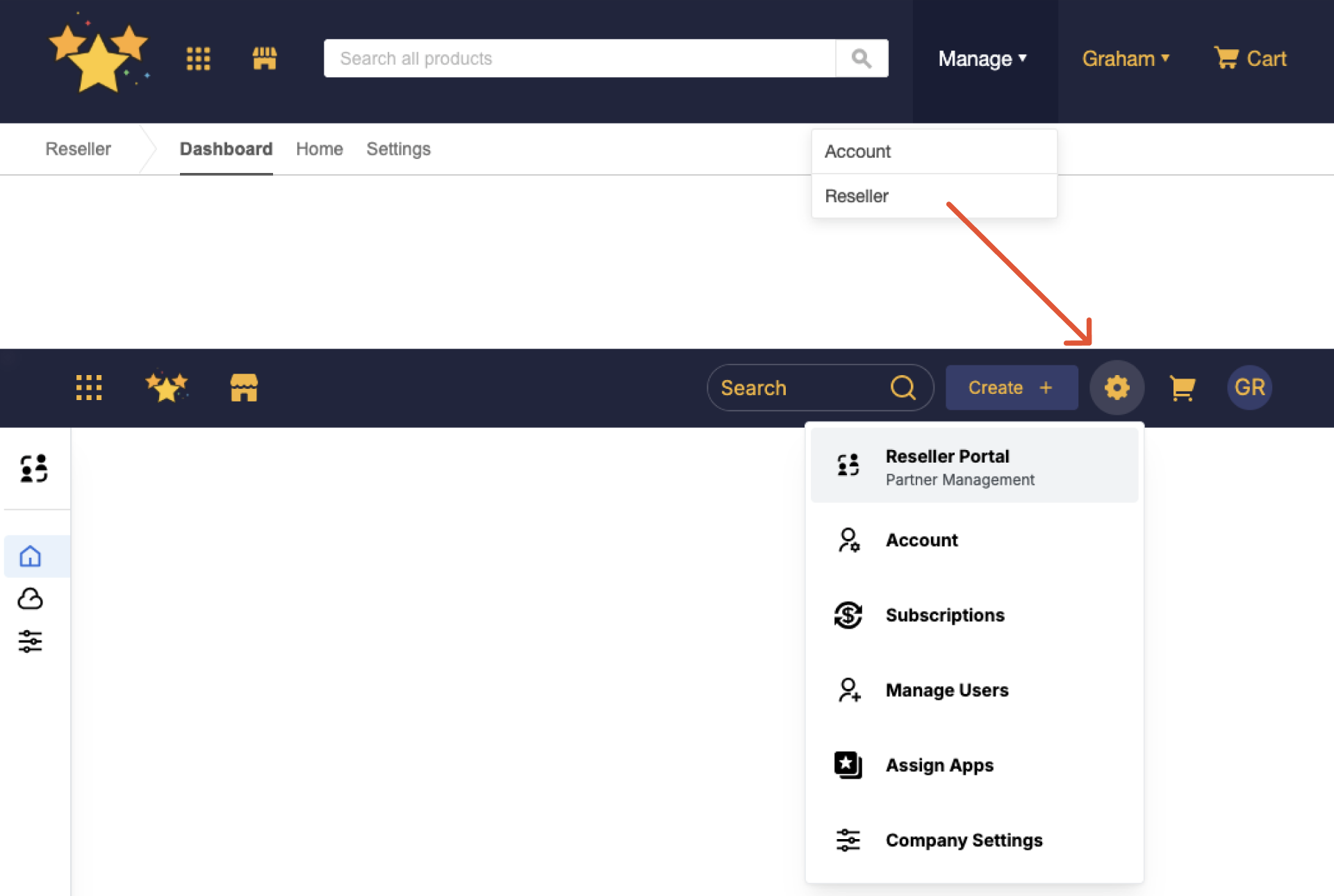
The following placeholders describe the prior experiences and the new layout. When a screen matches one of the "before" examples, the marketplace adopts the new global navigation experience after it is enabled and setting configuration is completed.
- Previous layout — alternate header with the Manage menu

- Previous layout — horizontal menu across the top

- New global navigation experience with the vertical menu on the left

Role-based navigation changes
| Role | Older navigation | What changes |
|---|---|---|
| Marketplace manager | Previous layout — alternate header and menus such as Manage | Updated header styling and left navigation; Create and Settings appear in the header; items previously under Manage move under the Grid menu. |
| Marketplace manager | Previous layout — horizontal menu across the top | Updated header styling and branding; a left-hand navigation replaces the horizontal pattern. Cart does not appear in the new experience for Marketplace managers. |
| End-user (Company Admin) | Previous layout — horizontal menu across the top | Updated header styling and left navigation; Create and Settings in the header; items previously under Manage move under the Grid menu. The logo in the header will continue to navigate to the homepage. |
Key highlights
- Consistent branding — The new header inherits branding from the Storefront Theme editor, including colors and logo, providing a consistent experience across storefront and back-office pages.
- Easier navigation — The new left navigation replaces a horizontal system. Users can now reach any page with fewer clicks, with no intermediate page loads required.
- Relevant menu actions — The Create and Settings menu in the header are tailored to user roles, surfacing only the actions and settings relevant to the role.
- Uniform structure — All users share the same consistent header and navigation structure regardless of their roles.
❗ Important: The older navigation layouts will be deprecated with the General Availability (GA) release of the new navigation. A six-month deprecation period will be applicable. For more information on product lifecycle phases, see AppDirect product lifecycle phases.
Feature enablement
Feature enablement differs by marketplace type:
- Self-serve: For marketplaces created through online self-serve sign-up, the new navigation is enabled by default. A preview banner and adoption settings are available for all eligible users. Marketplace managers can control when to switch over for themselves and other users. For more information on preview and adoption settings, see the Setting Enablement section below.
- Enterprise: For marketplaces provisioned through an assisted onboarding program, contact your AppDirect technical representative or Account manager for availability and enablement steps.
Setting enablement
Setting enablement is required. After the feature is enabled, preview and full adoption are configured using marketplace settings. To enable these settings:
- Go to Settings > Marketplace Functionality > Customer UI.
- Enable these settings as required:
- User preview: Marketplace managers can use this option to preview the navigation to other users, giving them the opportunity to explore the new navigation.
- Full adoption: Enable new navigation for all users. Once enabled, the preview banner is removed and all users are switched to the new navigation.

Documentation
Navigation paths across documentation will be updated in phases to align with the deprecation of the legacy navigation experience.
Was this page helpful?
Tell us more…
Help us improve our content. Responses are anonymous.
Thanks
We appreciate your feedback!